
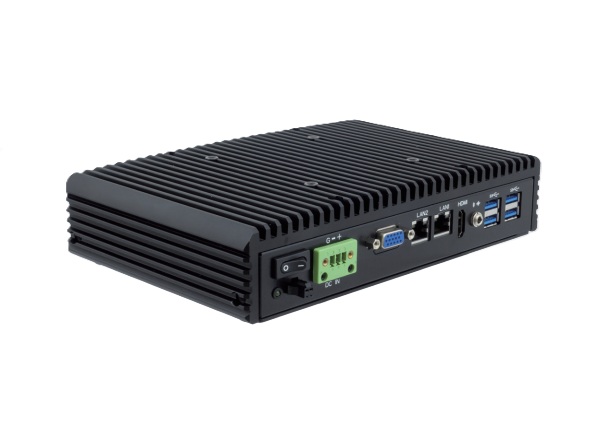
Artificial intelligence is moving from the cloud to the factory floor because many industrial decisions cannot wait for a round trip to a remote data center. GPU-accelerated edge computing enables real-time AI inference directly where data is generated — on production lines, at inspection stations, and inside autonomous systems. This eliminates cloud latency, reduces bandwidth costs, and enables AI-powered decisions in milliseconds. For a buyer, the important distinction is not only raw compute speed but whether the system can sustain that speed in a hot enclosure, near vibration, and under continuous production load. A system that throttles after the first hour can miss defects, delay robot motion, or force a line to run slower than planned. Selection should therefore include thermal margin, camera bandwidth, expansion options, and the software stack needed to maintain models over the life of the machine.
Why GPUs at the Edge?
CPUs can run AI models, but GPUs process them 10-100x faster thanks to massively parallel architecture. General-purpose processors are excellent for sequential logic and control tasks, while graphics processors can evaluate thousands of pixels, features, or neural-network operations at the same time. In machine vision, that parallelism can be the difference between inspecting every part on a fast conveyor and sampling only a fraction of production. Memory bandwidth and driver maturity also matter because high-resolution images must move from cameras to inference engines without creating unpredictable delays. Engineers should compare sustained throughput using the actual model and camera count, not only peak TOPS or benchmark numbers. For industrial applications requiring real-time inference, this speed difference is critical:
| Task | CPU Inference | GPU Inference |
|---|---|---|
| Image classification | 50-200ms | 2-10ms |
| Object detection | 200-500ms | 10-30ms |
| Defect segmentation | 500ms-2s | 20-50ms |
| Video analytics (4K) | Not feasible | Real-time |
Industrial Machine Vision Applications
Automated Quality Inspection
High-speed cameras capture images of every product, often from multiple angles and under controlled lighting. GPU-powered AI models can analyze those images fast enough to reject defective parts before they move downstream, reducing rework and preventing bad assemblies from reaching packaging or customers. This is particularly valuable in electronics, food processing, medical-device production, and automotive lines where human visual inspection is either too slow or too inconsistent. Lighting, lens selection, and trigger timing remain critical because even the best model will struggle with glare, motion blur, or inconsistent part presentation. Operations teams should plan how rejected images, model versions, and inspection results will be stored for traceability and later improvement. Common inspection tasks include:
- Surface defects: Scratches, dents, discoloration, contamination
- Dimensional accuracy: Measurement verification against tolerances
- Assembly verification: Correct component placement and orientation
- Label and print quality: OCR verification, barcode readability
Bin Picking and Robotic Guidance
Bin picking is difficult because parts overlap, rotate, and partially hide one another in ways that traditional fixturing avoids. 3D vision systems with GPU processing can interpret depth maps and point clouds quickly enough for a robot to choose a grasp without stopping the cell. The tradeoff is that lighting, camera placement, and end-effector design still matter, so the computer must be sized as part of the whole automation system. A failed pick can scratch a part, jam a gripper, or stop an upstream conveyor, so inference latency and confidence thresholds have direct production consequences. Integrators should verify camera synchronization, Ethernet or USB bandwidth, and recovery behavior when the bin contains unexpected debris or mixed parts. With the right vision stack, robots can perform the following actions:
- Identify and locate randomly oriented parts in bins
- Calculate optimal grip position and approach angle
- Adapt to variations in part position and orientation in real-time
Safety Monitoring
Safety monitoring benefits from edge processing because alerts must be generated locally and immediately. AI-powered cameras with edge GPU processing can watch hazardous zones, forklift aisles, and loading docks without streaming all video to a remote server for analysis. These systems complement, rather than replace, engineered safety controls because false positives, camera blind spots, and site policies must be considered. In a warehouse or loading area, even a short delay can mean the warning arrives after a pedestrian and vehicle have already crossed paths. Buyers should verify how events are logged, how privacy requirements are handled, and how the system behaves when a camera is blocked or lighting changes. Common detections include:
- Workers entering hazardous zones
- PPE compliance (hard hat, safety vest, goggles)
- Unsafe behaviors or ergonomic risks
- Vehicle-pedestrian proximity in warehouse environments
GPU Hardware Options for Industrial Edge
NVIDIA Jetson Platform
- Jetson Orin Nano: 20-40 TOPS, fanless capable, entry-level edge AI
- Jetson Orin NX: 70-100 TOPS, mid-range inference performance
- Jetson AGX Orin: 200+ TOPS, multi-camera, multi-model workloads
Discrete GPUs in Industrial PCs
- NVIDIA RTX A-series: Professional GPUs with ECC memory, certified drivers
- Intel Arc A-series: Emerging alternative with OneAPI software stack
- Form factors: MXM modules, PCIe cards (half-height for compact systems)
Neural Processing Units (NPUs)
- Intel Movidius: Ultra-low-power inference for simple classification
- Hailo-8: 26 TOPS in M.2 form factor, industrial temperature range
- Integrated NPUs: Intel Meteor Lake and AMD Ryzen AI include on-chip NPUs
Industrial Hardware Considerations
Thermal Management
GPUs generate significant heat, and sustained inference loads can expose thermal weaknesses that short benchmark runs do not reveal. In an industrial enclosure, that heat may be combined with dust, restricted airflow, high ambient temperature, or nearby motors and power supplies. Proper thermal design protects performance because many GPUs reduce clock speed when temperatures rise, which can increase inspection latency or lower camera throughput. The heat path from GPU die to enclosure wall, fan filter, or heat sink should be reviewed as carefully as the processor specification. For sealed cabinets, installers may also need cabinet air conditioning, heat exchangers, or derating based on the worst expected ambient temperature. Industrial GPU systems need the following design provisions:
- Active cooling with filtered, sealed fan assemblies for high-TDP GPUs
- Fanless designs limited to lower-TDP GPUs (Jetson, MXM modules under 25W)
- Operating temperature derating for GPU workloads at sustained load
Power Requirements
- Entry-level edge AI: 15-25W total system power (fanless possible)
- Mid-range inference: 50-100W (compact fan-cooled)
- Multi-GPU workstations: 200-500W (rack mount with robust cooling)
Software Stack
- NVIDIA CUDA / TensorRT: Industry standard for GPU inference optimization
- Intel OpenVINO: CPU/GPU/NPU inference optimization for Intel hardware
- ONNX Runtime: Cross-platform model inference
- Docker containers: Simplify deployment and updates of AI models
Acnodes Corporation offers GPU-accelerated industrial computers for edge AI and machine vision applications. Contact us for AI hardware configuration assistance.